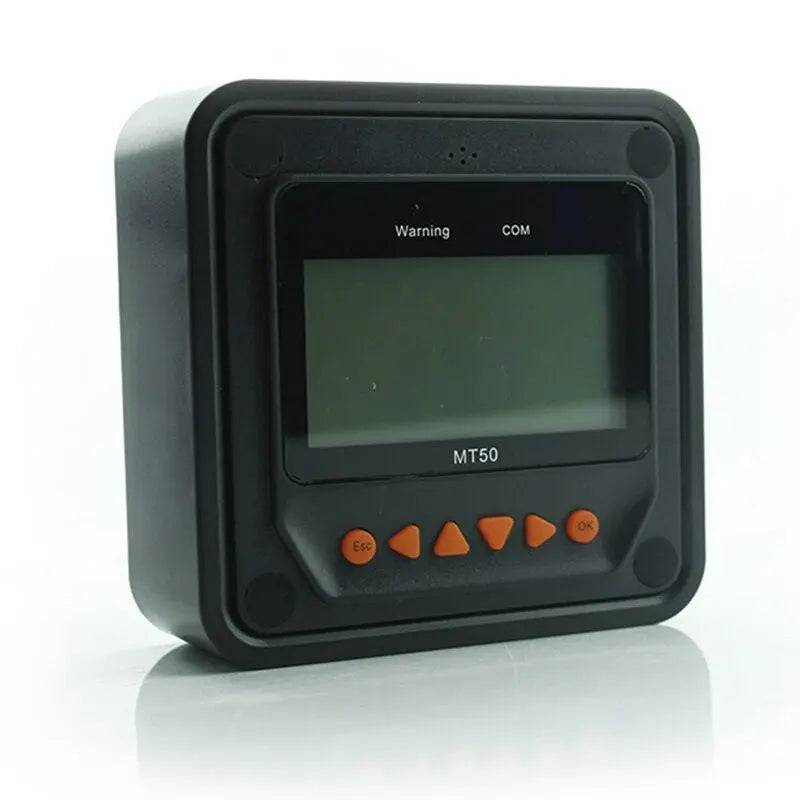
MT-50 Remote Meter Display MPPT Solar Charge Controller Monitoring RS485
MT-50 Remote Meter Display MPPT Solar Charge Controller Monitoring RS485
Couldn't load pickup availability
MT-50 Remote Meter Display MPPT Solar Charge Controller Monitoring RS485
Professional remote monitoring display for MPPT solar charge controllers with RS485 communication. Real-time visualization of solar power generation, battery voltage, charging current, and system status from up to 50 meters away. Compatible with Tracer, ViewStar, TRIRON, and other RS485-equipped MPPT controllers. Includes 2-meter standard cable with RJ45 connectors.
⚡ Key Benefits
- ✅ Remote monitoring — view system data up to 50m away via RS485 cable
- ✅ Real-time statistics — voltage, current, power, battery %, daily/monthly energy
- ✅ Wide compatibility — Tracer AN/BN/CN, ViewStar, TRIRON, iTracer series
- ✅ Backlit LCD display — readable in low-light conditions, 2.5-inch screen
- ✅ Parameter adjustment — modify charging voltages, load control, battery type remotely
⚙️ Technical Specifications
| Parameter | Specification |
|---|---|
| Communication Protocol | RS485 (Modbus RTU) |
| Baud Rate | 115200 bps |
| Cable Length (standard) | 2 meters (6.6 feet) with RJ45 connectors |
| Maximum Cable Extension | 50 meters (164 feet) with signal repeater or shielded cable |
| Display Type | 2.5-inch backlit monochrome LCD |
| Displayed Parameters | PV voltage/current/power, battery voltage/current/SOC, load voltage/current/power, daily/monthly Ah/Wh, temperature, error codes |
| Button Controls | 4 buttons (UP, DOWN, ENTER, RETURN) for menu navigation |
| Power Supply | Powered via RS485 cable from controller (no external power required) |
| Operating Temperature | -10°C to +50°C (14°F to 122°F) |
| Dimensions (L×W×H) | 120 × 85 × 25 mm (4.7 × 3.3 × 1.0 inches) |
| Weight | 0.15 kg (0.33 lbs) |
| Mounting | Wall-mount via two screw holes, or desktop stand (included) |
| Certifications | CE, RoHS |
🔌 Compatible MPPT Controller Series
The MT-50 meter is compatible with the following EPEVER/EPsolar controller series:
- Tracer AN Series: Tracer 1210AN, 2210AN, 3210AN, 4210AN (10A-40A, 12/24V)
- Tracer BN Series: Tracer 2215BN, 3215BN, 4215BN (15A-40A, 12/24V with Bluetooth)
- Tracer CN Series: Tracer 10420CN, 10430CN (20A-30A, 100V input)
- ViewStar Series: ViewStar 1024AU, 2024AU, 3024AU, 4524AU (10A-45A, 12/24V)
- TRIRON Series: TRIRON 1210N, 2210N, 3210N, 4210N (10A-40A, 12/24V, MPPT+DC-DC boost)
- iTracer Series: iTracer IT3415ND, IT4415ND (30A-40A, 12/24/36/48V)
Compatibility Check: Verify your controller has an RJ45 port labeled "RS485" or "COM" on the side panel. If your controller only has USB or no communication port, it is not compatible with MT-50.
📊 What You Can Monitor
The MT-50 displays 8 rotating screens with comprehensive system data:
- Screen 1 (Main): Battery voltage, battery current (charging or discharging), battery state of charge (%)
- Screen 2 (Solar): PV array voltage, PV charging current, PV power (watts)
- Screen 3 (Load): Load voltage, load current, load power, load running hours
- Screen 4 (Energy Today): Daily energy generated (Ah and Wh), daily energy consumed by loads
- Screen 5 (Energy Total): Cumulative energy generated (Ah and Wh), total operating days
- Screen 6 (Temperature): Controller internal temperature, battery temperature (if sensor connected)
- Screen 7 (Status): Charging mode (bulk/boost/float/equalize), battery type, load control mode
- Screen 8 (Errors): Fault codes (battery overvoltage, PV overvoltage, load overcurrent, etc.)
🔧 Installation & Wiring
Step 1: Locate the RJ45 port on your MPPT controller (usually on the right side panel, labeled "COM" or "RS485").
Step 2: Connect the provided 2-meter RJ45 cable from the controller to the MT-50 display. The cable is polarized; orientation does not matter as RJ45 is auto-sensing.
Step 3: Mount the MT-50 display on a wall using two screws (not included), or use the included desktop stand. Ensure the display is within the 2-meter cable reach, or extend the cable up to 50 meters using CAT5e/CAT6 shielded Ethernet cable.
Step 4: Power on the controller. The MT-50 display powers up automatically via the RS485 cable (no external power needed). The LCD backlight activates and displays system data within 5 seconds.
Cable Extension: To extend beyond 2 meters, use standard CAT5e or CAT6 shielded cable with RJ45 couplers. Maximum tested distance: 50 meters. For runs >20 meters, use shielded cable to prevent electromagnetic interference (EMI) from nearby AC wiring.
⚙️ Adjusting Controller Settings Remotely
The MT-50 allows you to modify MPPT controller parameters without physically accessing the controller:
- Battery Type: Change between Sealed, Gel, Flooded, Lithium profiles
- Charging Voltages: Adjust boost voltage, float voltage, equalization voltage (advanced users only)
- Load Control: Set timer schedules (e.g., lights on at dusk, off at dawn), manual on/off, light sensor mode
- Temperature Compensation: Enable/disable automatic voltage adjustment based on battery temperature
- Data Logging: View historical daily/monthly energy production and consumption statistics
Caution: Incorrect voltage settings can damage batteries or reduce lifespan. Only modify charging voltages if you understand the implications. Consult your battery manufacturer's specifications before changing default values.
🏕️ Use Cases & Applications
Off-Grid Homes: Mount MT-50 indoors (kitchen, living room) while the MPPT controller is installed outdoors in a weatherproof enclosure. Monitor solar production and battery status without going outside.
RVs and Boats: Install controller in engine bay or storage compartment; mount MT-50 near the driver's seat or navigation station for easy monitoring while traveling.
Remote Monitoring Stations: Extend cable up to 50 meters to monitor solar systems on rooftops, sheds, or distant locations from a central monitoring point.
Commercial Solar Installations: Use MT-50 as a customer-facing display to show real-time system performance in lobbies, showrooms, or public spaces.
❓ Frequently Asked Questions
1. Can I use the MT-50 without a remote meter?
Yes. The MPPT controller functions fully without the MT-50 display. However, you will only see basic information on the controller's built-in LCD (if equipped). The MT-50 provides detailed statistics, remote access, and parameter adjustment capabilities that built-in displays typically do not offer.
2. What is the maximum cable distance I can extend?
50 meters (164 feet) using shielded CAT5e or CAT6 cable. Beyond 50 meters, signal degradation may occur, causing intermittent display dropouts or communication errors. For runs >50m, use an RS485 signal repeater (not included).
3. Can I connect multiple MT-50 displays to one controller?
Yes, but it requires an RS485 splitter or daisy-chain adapter (not included). Up to 4 MT-50 displays can be connected to a single controller, useful for multi-location monitoring in large systems.
4. Does the MT-50 work with PWM controllers?
No. The MT-50 is designed exclusively for MPPT controllers with RS485 communication. PWM controllers typically lack RS485 ports and use different communication protocols.
5. What if my controller is not listed in the compatibility section?
Check your controller's manual for RS485 support and Modbus RTU protocol. If your controller has an RJ45 port labeled "RS485" and uses Modbus RTU at 115200 bps, the MT-50 will likely work. Contact the manufacturer to confirm compatibility before purchase.
6. Can I request a quote or estimate?
No quote is necessary. You can purchase this product directly through our website with transparent pricing and no hidden fees.
📦 Shipping & Delivery
This product ships from warehouses in North America, Europe, or Asia depending on your location, with typical delivery of 7-15 business days. International orders are processed through standard postal services with full tracking. Expedited shipping is not available for this item.
🛡️ Why Trust Us
We have served renewable energy enthusiasts, off-grid homeowners, and marine professionals for over 8 years, maintaining a 98% positive customer rating across 15+ countries. Our technical team personally tests every remote display batch before shipment. We guarantee a 30-day full refund if this display does not meet your expectations, no questions asked.
Product Images